
Javascript est l’un des plus cruciaux langages de programmation côté Front-end. Il facilite énormément beaucoup de choses, mais parfois il est difficile de comprendre les comportements non-habituels sur Javascript. L’ES6 à ES13 a été exposée majoritairement dans le but de résoudre ces comportements étranges sur Javascript et pour qu’on puisse avoir un meilleur code. Et dans cet article, il vous est proposée une liste essentielle des fonctionnalités que vous devriez au moins connaitre aujourd’hui de l’ES6 à l’ES13.

Beaucoup de développeurs ont sûrement déjà écrit ce genre de code et ont passé des jours à essayer de trouver le problème.
Même si maintenant Typescript est devenu une alternative à ce problème, le souci reste JS car nos codes sont transpilés en JS. Alors il existe des nouveaux scripts pour supporter notre développement et corriger petit à petit ces incohérences grâce à l’ECMA Script.
Voici toutes les nouveautés indispensables à connaitre de l’ES6 à l’ES13.
ES6 (ES2015)#
Class#
JavaScript est un langage qui utilise la chaîne de prototype. Des concepts similaires à POO ont été créés via la chaîne de prototypes, mais l'écriture est assez compliquée. Et depuis ES6, on peut enfin écrire des « CLASS »
 <span class="hljs-keyword">class</span> <span class="hljs-title class_">Animale</span> {
        <span class="hljs-title function_">constructor</span>(<span class="hljs-params">name, color</span>) {
            <span class="hljs-variable language_">this</span>.<span class="hljs-property">name</span> = name
            <span class="hljs-variable language_">this</span>.<span class="hljs-property">color</span> = color
        }
        <span class="hljs-comment">// Il s'agit d'une propriété sur la chaîne de prototypestoString() {</span>
            <span class="hljs-variable language_">console</span>.<span class="hljs-title function_">log</span>(<span class="hljs-string">'name:'</span> + <span class="hljs-variable language_">this</span>.<span class="hljs-property">name</span> + <span class="hljs-string">', color:'</span> + <span class="hljs-variable language_">this</span>.<span class="hljs-property">color</span>)
        }
    }

    <span class="hljs-keyword">var</span> animale = <span class="hljs-keyword">new</span> <span class="hljs-title class_">Animale</span>(<span class="hljs-string">'myDog'</span>, <span class="hljs-string">'yellow'</span>) <span class="hljs-comment">// instancié</span>
    animale.<span class="hljs-title function_">toString</span>() <span class="hljs-comment">// name: myDog, color: yellow</span>

    <span class="hljs-variable language_">console</span>.<span class="hljs-title function_">log</span>(animale.<span class="hljs-title function_">hasOwnProperty</span>(<span class="hljs-string">'name'</span>)) <span class="hljs-comment">//trueconsole.log(animale.hasOwnProperty('toString')) // falseconsole.log(animale.__proto__.hasOwnProperty('toString')) // true</span>

    <span class="hljs-keyword">class</span> <span class="hljs-title class_">Chat</span> <span class="hljs-keyword">extends</span> <span class="hljs-title class_ inherited__">Animale</span> {
        <span class="hljs-title function_">constructor</span>(<span class="hljs-params">action</span>) {
            <span class="hljs-comment">// La sous-classe doit appeler la super fonction dans le constructeur, sinon une erreur sera signalée lorsque new sortira// Si le constructeur n'a pas été écrit à l'origine, le constructeur par défaut avec super sera automatiquement générésuper('chat', 'blanc')</span>
            <span class="hljs-variable language_">this</span>.<span class="hljs-property">action</span> = action
        }
        <span class="hljs-title function_">toString</span>() {
            <span class="hljs-variable language_">console</span>.<span class="hljs-title function_">log</span>(<span class="hljs-variable language_">super</span>.<span class="hljs-title function_">toString</span>())
        }
    }

    <span class="hljs-keyword">var</span> chat = <span class="hljs-keyword">new</span> <span class="hljs-title class_">Chat</span>(<span class="hljs-string">'catch'</span>)
    chat.<span class="hljs-title function_">toString</span>()

<span class="hljs-variable language_">console</span>.<span class="hljs-title function_">log</span>(chat <span class="hljs-keyword">instanceof</span> <span class="hljs-title class_">Chat</span>) <span class="hljs-comment">// trueconsole.log(chat instanceof Animale) // true</span>Module#
Chaque module a son propre espace de noms pour éviter les conflits, utilisez « import » et « export » pour importer et exporter.
Cette fonctionnalité était présente dans Node.js depuis longtemps et plusieurs bibliothèques et frameworks JavaScript ont permis l'utilisation de modules (CommonJS, AMD, RequireJS ou, plus récemment, Webpack et Babel).
Arrow function#
() => {…}, abréviation de fonction. Plus important encore, il peut s'assurer que cela pointe toujours vers lui-même.
Plus besoin d'écrire var self = this, var that = this, etc !
    <span class="hljs-keyword">const</span> <span class="hljs-title function_">somme</span> = (<span class="hljs-params">a, b</span>) => {
        <span class="hljs-keyword">return</span> a + b
    }

    <span class="hljs-keyword">const</span> res = <span class="hljs-title function_">somme</span>(<span class="hljs-number">1</span>, <span class="hljs-number">2</span>) <span class="hljs-comment">// 3</span>

    <span class="hljs-comment">// Si la syntaxe est simple, `{}` et `return` peuvent être omis. ça aura l'air plus propreconst soustraction = (a, b) => a - b</span>
    <span class="hljs-keyword">const</span> res1 = <span class="hljs-title function_">soustraction</span>(<span class="hljs-number">3</span>, <span class="hljs-number">1</span>) <span class="hljs-comment">// 2</span>
Function parameter default value#
Si la fonction ne transmet pas de paramètres, la valeur par défaut est utilisée. Écriture plus condensée et plus claire.
<span class="hljs-keyword">function</span> <span class="hljs-title function_">exemple</span>(<span class="hljs-params">height = <span class="hljs-number">50</span>, width = <span class="hljs-number">40</span></span>) {
        <span class="hljs-keyword">const</span> newH = height * 10<span class="hljs-keyword">const</span> newW = width * 10<span class="hljs-keyword">return</span> newH + newW
    }

    <span class="hljs-title function_">exemple</span>() <span class="hljs-comment">// 900 (50*10 + 40*10)</span>
Template literal#
La composition des chaînes longues, dans le passé, était concaténée par le signe « + ». Sa lisibilité est assez mauvaise. Avec les chaînes de modèle (template strings), c'est beaucoup plus facile à lire.
    <span class="hljs-keyword">const</span> firstName = <span class="hljs-string">'Ken'</span><span class="hljs-keyword">const</span> lastName = <span class="hljs-string">'Huang'</span><span class="hljs-comment">// ne pas utiliser le modèle littéralconst name = 'Hello, My name is' + firstName + ', ' + lastName</span>
    <span class="hljs-comment">// tiliser le modèle littéralconst nameWithLiteralString = `Hello, My name is ${firstName}, ${lastName}`</span>
Destructuring assignment #
La syntaxe d'affectation de déstructuration est une expression JavaScript qui permet de décompresser des valeurs de tableaux, ou des propriétés d'objets, dans des variables distinctes.
    <span class="hljs-keyword">const</span> arr = [<span class="hljs-number">1</span>, <span class="hljs-number">2</span>, <span class="hljs-number">3</span>, <span class="hljs-number">4</span>, <span class="hljs-number">5</span>];
    <span class="hljs-keyword">const</span> [one, two, three] = arr;
    <span class="hljs-variable language_">console</span>.<span class="hljs-title function_">log</span>(one); <span class="hljs-comment">// 1console.log(two); // 2console.log(three); // 3</span>

    <span class="hljs-comment">// Pour ignorer certaines valeursconst [first,,,,last] = arr;</span>
    <span class="hljs-variable language_">console</span>.<span class="hljs-title function_">log</span>(first); <span class="hljs-comment">// 1console.log(last); // 5</span>

    <span class="hljs-comment">// Les objets peuvent également être déstructurés et assignésconst etudiant = { </span>
        <span class="hljs-attr">name</span>: <span class="hljs-string">'Ken Huang'</span>,
        <span class="hljs-attr">age</span>: <span class="hljs-number">38</span>,
        <span class="hljs-attr">city</span>: <span class="hljs-string">'Taipei'</span>
    };
    <span class="hljs-keyword">const</span> {name, age, city} = etudiant;
    <span class="hljs-variable language_">console</span>.<span class="hljs-title function_">log</span>(name); <span class="hljs-comment">// "Ken Huang"console.log(age); // "38"console.log(city); // "Taipei"</span>
Spread operator#
La syntaxe spread (...) permet à un itérable, tel qu'un tableau ou une chaîne, d'être étendu aux endroits où zéro ou plusieurs arguments (pour les appels de fonction) ou éléments (pour les littéraux de tableau) sont attendus. Dans un littéral d'objet, la syntaxe de propagation énumère les propriétés d'un objet et ajoute les paires clé-valeur à l'objet en cours de création.
const etudiants = [<span class="hljs-string">'Angel'</span>, <span class="hljs-string">'Ryan'</span>];
    const personnes = [<span class="hljs-string">'Sara'</span>, ...etudiants, <span class="hljs-string">'Kelly'</span>, <span class="hljs-string">'Eason'</span>];
    conslog.log(peopersonnesple); <span class="hljs-regexp">//</span> [<span class="hljs-string">"Sara"</span>, <span class="hljs-string">"Angel"</span>, <span class="hljs-string">"Ryan"</span>, <span class="hljs-string">"Kelly"</span>, <span class="hljs-string">"Eason"</span>]
Object property shorthand#
La valeur peut être omise si les noms de champ qui composent l'objet sont les mêmes que les variables des paragraphes précédents. L’écriture semble être plus épurée.
    <span class="hljs-keyword">const</span> nom = <span class="hljs-string">'Angel'</span>,
        age = <span class="hljs-number">18</span>,
        city = <span class="hljs-string">'ChangHwa'</span>

    <span class="hljs-comment">// Avant ES6, il faut écrire comme çaconst client = {</span>
        <span class="hljs-attr">name</span>: nom,
        <span class="hljs-attr">age</span>: age,
        <span class="hljs-attr">city</span>: city,
    } <span class="hljs-comment">// {name: 'Angel', age: 18, city: 'ChangHwa'}</span>

    <span class="hljs-comment">// Après ES6, nous pouvons le faireconst newCustomer = {</span>
        name,
        age,
        city,
} <span class="hljs-comment">// {name: 'Angel, age: 18, city: 'ChangHwa'}</span>Promise#
La promesse est une solution à l'écriture asynchrone (non synchrone), qui est plus élégante que l'écriture de rappel d'origine.
Au début, c'était une suite de la communauté open-source, et plus tard, il a été incorporé dans la norme linguistique.
Avant c’était du callback hell…
    <span class="hljs-title function_">getArticles</span>(<span class="hljs-number">20</span>, <span class="hljs-function">(<span class="hljs-params">user</span>) =></span> {
        <span class="hljs-variable language_">console</span>.<span class="hljs-title function_">log</span>(<span class="hljs-string">"Fetch articles"</span>, user);
        <span class="hljs-title function_">getUserData</span>(user.<span class="hljs-property">username</span>, <span class="hljs-function">(<span class="hljs-params">name</span>) =></span> {
            <span class="hljs-variable language_">console</span>.<span class="hljs-title function_">log</span>(name);
            <span class="hljs-title function_">getAddress</span>(name, <span class="hljs-function">(<span class="hljs-params">item</span>) =></span> {
                <span class="hljs-variable language_">console</span>.<span class="hljs-title function_">log</span>(item);
                <span class="hljs-comment">// this goes on and on...</span>
            }
        })
    })
Après avoir utilisé des promesses, l'enfer des rappels est aplati.
    <span class="hljs-keyword">const</span> waitSecond = <span class="hljs-keyword">new</span> <span class="hljs-title class_">Promise</span>(<span class="hljs-function">(<span class="hljs-params">resolve, reject</span>) =></span> {
        <span class="hljs-built_in">setTimeout</span>(resolve, <span class="hljs-number">1000</span>);
    });
    waitSecond.<span class="hljs-title function_">then</span>( <span class="hljs-function">() =></span> {
        <span class="hljs-variable language_">console</span>.<span class="hljs-title function_">log</span>(<span class="hljs-string">'hello World after 1 second.'</span>);
        <span class="hljs-comment">// output this line after 1 secondreturn waitSecond;</span>
    }).<span class="hljs-title function_">then</span>( <span class="hljs-function">() =></span> {
        <span class="hljs-variable language_">console</span>.<span class="hljs-title function_">log</span>(<span class="hljs-string">'Hell World after 2 sceond.'</span>);
        <span class="hljs-comment">// output this line after 2second</span>
    })
Et ES8 (ES2017) a sorti un async plus parfait, await, qui rend directement l'écriture asynchrone comme la synchronisation.
L'inconvénient est que lorsque les pensées tombent sur un logique métier complexe, l'attente est parfois manquée et des erreurs sont trouvées au moment de l'exécution.
let, const to replace var
let : variable générale, peut être surchargée
const : Une fois déclaré, son contenu ne peut être modifié. Comme les tableaux et les objets sont des indicateurs, leur contenu peut être augmenté ou diminué, mais on ne peut pas pour changer ses références respectives
Au début, la portée var de js était globale.
C'est-à-dire que la variable est déclarée après son utilisation. Lors de son exécution, il sera automatiquement mentionné au niveau supérieur et il sera affecté ultérieurement.
<span class="hljs-variable language_">console</span>.<span class="hljs-title function_">log</span>(a); <span class="hljs-comment">// undefinedvar a = 10;</span>En utilisant let ou const
<span class="hljs-variable language_">console</span>.<span class="hljs-title function_">log</span>(a); <span class="hljs-comment">// ReferenceError: Cannot access 'a' before initializationlet a = 10;</span>ES7 (ES2016)#
Array.prototype.includes()#
La méthode includes() détermine si un tableau inclut une certaine valeur parmi ses entrées, renvoyant true ou false selon le cas.
    <span class="hljs-keyword">const</span> tableau=[<span class="hljs-number">5</span>,<span class="hljs-number">7</span>,<span class="hljs-number">8</span>,<span class="hljs-number">3</span>,<span class="hljs-number">5</span>,<span class="hljs-number">2</span>]
    <span class="hljs-comment">//Vérifie si le tableau contient le chiffre 3</span>
    tableau.<span class="hljs-title function_">includes</span>(<span class="hljs-number">3</span>) <span class="hljs-comment">//true</span>
Exponentiation Operator#
<span class="hljs-variable language_">console</span>.<span class="hljs-title function_">log</span>(<span class="hljs-number">2</span>**<span class="hljs-number">10</span>); <span class="hljs-comment">// 1024// Est égale à console.log(Math.pow(2, 10)); // 1024</span>ES8 (ES2017)#
async, await#
La déclaration de fonction asynchrone déclare une fonction asynchrone où le mot clé « await » est autorisé dans le corps de la fonction. Les mots clés « async » et « await » permettent d'écrire un comportement asynchrone basé sur des promesses dans un style plus propre, évitant ainsi d'avoir à configurer explicitement des chaînes de promesses.
Les fonctions asynchrones peuvent également être définies comme des expressions.
<span class="hljs-keyword">async</span> <span class="hljs-title function_">getUsers</span>() {
        <span class="hljs-keyword">try</span> {
            <span class="hljs-keyword">const</span> result = <span class="hljs-keyword">await</span> <span class="hljs-title function_">fetch</span>(<span class="hljs-string">'api/users/'</span>);
            <span class="hljs-variable language_">console</span>.<span class="hljs-title function_">log</span>(result); <span class="hljs-comment">// Résultat de sortie</span>
        } <span class="hljs-keyword">catch</span>(e) {
            <span class="hljs-variable language_">console</span>.<span class="hljs-title function_">log</span>(e); <span class="hljs-comment">// Peut intercepter des erreurs si fetch('api/users/') renvoie une erreur</span>
        }
}Object.values()#
Renvoie toutes les valeurs des propres propriétés de l'objet, à l'exclusion des valeurs héritées.
    <span class="hljs-keyword">const</span> <span class="hljs-title class_">Car</span> = {
        <span class="hljs-attr">modele</span>: <span class="hljs-string">'Chevrolet CAPTIVA'</span>,
        <span class="hljs-attr">disponible</span>: <span class="hljs-literal">false</span>,
        <span class="hljs-attr">year</span>: <span class="hljs-number">2008</span>
    };

    <span class="hljs-variable language_">console</span>.<span class="hljs-title function_">log</span>(<span class="hljs-title class_">Object</span>.<span class="hljs-title function_">values</span>(<span class="hljs-title class_">Car</span>));
<span class="hljs-comment">//Sortie attendue: Array ["Chevrolet CAPTIVA", false, 2008]</span>Object.entries()#
La méthode statique Object.entries() renvoie un tableau des propres paires clé-valeur de propriétés énumérables d'un objet donné.
    <span class="hljs-keyword">const</span> <span class="hljs-title class_">Car</span> = {
        <span class="hljs-attr">modele</span>: <span class="hljs-string">'Chevrolet CAPTIVA'</span>,
        <span class="hljs-attr">disponible</span>: <span class="hljs-literal">false</span>,
        <span class="hljs-attr">year</span>: <span class="hljs-number">2008</span>
    };

    <span class="hljs-variable language_">console</span>.<span class="hljs-title function_">log</span>(<span class="hljs-title class_">Object</span>.<span class="hljs-title function_">entries</span>(<span class="hljs-title class_">Car</span>));
    <span class="hljs-comment">// Sortie attendue: Array [Array(2), Array(2), Array(2)]</span>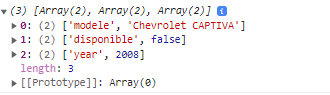
String padStart() & padEnd()#
La méthode padStart() remplit la chaîne actuelle avec une autre chaîne (plusieurs fois, si nécessaire) jusqu'à ce que la chaîne résultante atteigne la longueur donnée. Le rembourrage est appliqué depuis le début avec « padSart » et depuis la fin avec « padEnd » de la chaîne courante.
Dans le passé, ces fonctions étaient généralement introduites avec des kits auxiliaires universels (tels que lodash) et les avaient ensemble.
<span class="hljs-comment">// padStart</span>
<span class="hljs-string">'100'</span>.<span class="hljs-title function_">padStart</span>(<span class="hljs-number">5</span>, <span class="hljs-number">0</span>); <span class="hljs-comment">// 00100</span>
<span class="hljs-comment">// Si le contenu à remplir dépasse la "longueur de remplissage". Remplissez ensuite de la gauche jusqu'à la limite supérieure de la longueur</span>
<span class="hljs-string">'100'</span>.<span class="hljs-title function_">padStart</span>(<span class="hljs-number">5</span>, <span class="hljs-string">'987'</span>); <span class="hljs-comment">// 98100</span>

<span class="hljs-comment">// padEnd</span>
<span class="hljs-string">'100'</span>.<span class="hljs-title function_">padEnd</span>(<span class="hljs-number">5</span>, <span class="hljs-number">9</span>); <span class="hljs-comment">// 10099</span>
<span class="hljs-comment">// Si le contenu à remplir dépasse la "longueur de remplissage". Remplissez ensuite de la droite jusqu'à la limite supérieure de la longueur</span>
<span class="hljs-string">'100'</span>.<span class="hljs-title function_">padEnd</span>(<span class="hljs-number">5</span>, <span class="hljs-string">'987'</span>); <span class="hljs-comment">// 10098</span>
ES9 (ES2018)#
await in loop#
Dans une fonction asynchrone, il est parfois nécessaire d'utiliser une asynchrone (non synchrone) dans une boucle for synchrone.
    <span class="hljs-keyword">async</span> <span class="hljs-keyword">function</span> <span class="hljs-title function_">processus</span>(<span class="hljs-params">array</span>) {
        <span class="hljs-keyword">for</span> (<span class="hljs-keyword">const</span> i <span class="hljs-keyword">of</span> array) {
            <span class="hljs-keyword">await</span> <span class="hljs-title function_">operation</span>(i)
        }
    }

    <span class="hljs-keyword">async</span> <span class="hljs-keyword">function</span> <span class="hljs-title function_">processus</span>(<span class="hljs-params">array</span>) {
        array.<span class="hljs-title function_">forEach</span>(<span class="hljs-keyword">async</span> (i) => {
            <span class="hljs-keyword">await</span> <span class="hljs-title function_">operation</span>(i)
        })
    }
Le code ci-dessus ne produira pas le résultat souhaité comme prévu
La boucle for elle-même est toujours synchrone et exécutera l'intégralité de la boucle for avant que les fonctions asynchrones de la boucle ne soient terminées, puis exécutera les fonctions asynchrones une par une.
Dans ES9, on a des itérateurs asynchrones, permettant à await d'être utilisé avec des boucles for pour effectuer des opérations asynchrones étape par étape.
    <span class="hljs-keyword">async</span> <span class="hljs-keyword">function</span> <span class="hljs-title function_">processus</span>(<span class="hljs-params">array</span>) {
        <span class="hljs-keyword">for</span> <span class="hljs-keyword">await</span> (<span class="hljs-keyword">const</span> i <span class="hljs-keyword">of</span> array) {
            <span class="hljs-title function_">operation</span>(i)
        }
}promise.finally()#
La méthode finally() d'un objet Promise planifie l'appel d'une fonction lorsque la promesse est réglée (qu'elle soit remplie ou rejetée). Il renvoie immédiatement un objet Promise équivalent, vous permettant d'enchaîner les appels à d'autres méthodes de promesse.
Cela vous permet d'éviter la duplication de code dans les gestionnaires then() et catch() de la promesse.
    <span class="hljs-keyword">function</span> <span class="hljs-title function_">checkMail</span>() {
        <span class="hljs-keyword">return</span> <span class="hljs-keyword">new</span> <span class="hljs-title class_">Promise</span>(<span class="hljs-function">(<span class="hljs-params">resolve, reject</span>) =></span> {
          <span class="hljs-keyword">if</span> (<span class="hljs-title class_">Math</span>.<span class="hljs-title function_">random</span>() > <span class="hljs-number">0.5</span>) {
            <span class="hljs-title function_">resolve</span>(<span class="hljs-string">'Mail has arrived'</span>);
          } <span class="hljs-keyword">else</span> {
            <span class="hljs-title function_">reject</span>(<span class="hljs-keyword">new</span> <span class="hljs-title class_">Error</span>(<span class="hljs-string">'Failed to arrive'</span>));
          }
        });
      }

      <span class="hljs-title function_">checkMail</span>()
        .<span class="hljs-title function_">then</span>(<span class="hljs-function">(<span class="hljs-params">mail</span>) =></span> {
          <span class="hljs-variable language_">console</span>.<span class="hljs-title function_">log</span>(mail);
        })
        .<span class="hljs-title function_">catch</span>(<span class="hljs-function">(<span class="hljs-params">err</span>) =></span> {
          <span class="hljs-variable language_">console</span>.<span class="hljs-title function_">error</span>(err);
        })
        .<span class="hljs-title function_">finally</span>(<span class="hljs-function">() =></span> {
          <span class="hljs-variable language_">console</span>.<span class="hljs-title function_">log</span>(<span class="hljs-string">'Experiment completed'</span>);
        });
Rest, Spread#
Dans ES2015, les paramètres de longueur indéfinie Rest… peuvent être convertis en un tableau et sont transmis.
    <span class="hljs-keyword">function</span> <span class="hljs-title function_">restParams</span>(<span class="hljs-params">p1, p2, ...p3</span>) {
        <span class="hljs-variable language_">console</span>.<span class="hljs-title function_">log</span>(p1); <span class="hljs-comment">// 1console.log(p2); // 2console.log(p3); // [3, 4, 5]</span>
    }
    <span class="hljs-title function_">restParams</span>(<span class="hljs-number">1</span>, <span class="hljs-number">2</span>, <span class="hljs-number">3</span>, <span class="hljs-number">4</span>, <span class="hljs-number">5</span>);
Et la propagation est à l'opposé du reste, convertissant le tableau en un paramètre séparé.
Par exemple, Math.max() renvoie la valeur maximale dans le nombre entrant.
    <span class="hljs-keyword">const</span> values = [<span class="hljs-number">19</span>, <span class="hljs-number">90</span>, -<span class="hljs-number">2</span>, <span class="hljs-number">6</span>, <span class="hljs-number">25</span>];
    <span class="hljs-variable language_">console</span>.<span class="hljs-title function_">log</span>( <span class="hljs-title class_">Math</span>.<span class="hljs-title function_">max</span>(...values) ); <span class="hljs-comment">// 90</span>
Il fournit également la fonction de déstructuration des affectations pour les objets.
<span class="hljs-keyword">const</span> <span class="hljs-variable constant_">myObject</span> = {
        a: <span class="hljs-number">1</span>,
        b: <span class="hljs-number">2</span>,
        c: <span class="hljs-number">3</span>,
    }
    <span class="hljs-keyword">const</span> { a, ...r } = myObject
    <span class="hljs-comment">// a = 1// r = { b: 2, c: 3 }</span>

    <span class="hljs-comment">// Peut également être utilisé dans les paramètres d'entrée de fonctionfunction restObjectInParam({ a, ...r }) {</span>
        console.<span class="hljs-title function_ invoke__">log</span>(a) <span class="hljs-comment">// 1console.log(r) // {b: 2, c: 3}</span>
    }
    <span class="hljs-title function_ invoke__">restObjectInParam</span>({
        <span class="hljs-attr">a</span>: <span class="hljs-number">1</span>,
        <span class="hljs-attr">b</span>: <span class="hljs-number">2</span>,
        <span class="hljs-attr">c</span>: <span class="hljs-number">3</span>,
    })
RegExp groups#
Les groupes réunissent plusieurs modèles dans leur ensemble et les groupes de capture fournissent des informations de sous-correspondance supplémentaires lors de l'utilisation d'un modèle d'expression régulière pour faire correspondre une chaîne. Les références arrière renvoient à un groupe précédemment capturé dans la même expression régulière.
    <span class="hljs-keyword">const</span> regExpDate = <span class="hljs-regexp">/([0-9]{4})-([0-9]{2})-([0-9]{2})/</span>
    <span class="hljs-keyword">const</span> match = regExpDate.<span class="hljs-title function_">exec</span>(<span class="hljs-string">'2023-03-26'</span>)
    <span class="hljs-keyword">const</span> year = match[<span class="hljs-number">1</span>] <span class="hljs-comment">// 2023const month = match[2] // 03const day = match[3] // 26</span>
Regexp dotAll#
La propriété dotAll indique si le marqueur "s" est utilisé pour l'expression rationnelle. dotAll est une propriété en lecture seule et qui renseigne à propos de l'expression rationnelle courante.
/hello.world/.test(<span class="hljs-string">'hello\nworld'</span>); <span class="hljs-regexp">//</span> <span class="hljs-literal">false</span>/hello.world/s.test(<span class="hljs-string">'hello\nworld'</span>); <span class="hljs-regexp">//</span> <span class="hljs-literal">true</span>ES10 (ES2019)#
Array.prototype.flat() & Array.prototype.flatMap()#
Aplatit le tableau
    <span class="hljs-keyword">const</span> arr1 = [<span class="hljs-number">1</span>, <span class="hljs-number">2</span>, [<span class="hljs-number">3</span>, <span class="hljs-number">4</span>]]
    arr1.<span class="hljs-title function_">flat</span>() <span class="hljs-comment">// [1, 2, 3, 4]</span>

    <span class="hljs-keyword">const</span> arr2 = [<span class="hljs-number">1</span>, <span class="hljs-number">2</span>, [<span class="hljs-number">3</span>, <span class="hljs-number">4</span>, [<span class="hljs-number">5</span>, <span class="hljs-number">6</span>]]]
    arr2.<span class="hljs-title function_">flat</span>() <span class="hljs-comment">// [1, 2, 3, 4, [5, 6]]// Pass in a number in flat, representing the flattening depth</span>
arr2.<span class="hljs-title function_">flat</span>(<span class="hljs-number">2</span>) <span class="hljs-comment">// [1, 2, 3, 4, 5, 6]</span>FlatMap()#
La méthode flatMap() renvoie un nouveau tableau formé en appliquant une fonction de rappel donnée à chaque élément du tableau, puis en aplatissant le résultat d'un niveau. C'est identique à un map() suivi d'un flat() de profondeur 1 (arr.map(...args).flat()), mais légèrement plus efficace que d'appliquer ces deux méthodes séparément.
    <span class="hljs-keyword">const</span> arr1 = [<span class="hljs-number">1</span>, <span class="hljs-number">2</span>, [<span class="hljs-number">3</span>], [<span class="hljs-number">4</span>, <span class="hljs-number">5</span>], <span class="hljs-number">6</span>, []];

    <span class="hljs-keyword">const</span> flattened = arr1.<span class="hljs-title function_">flatMap</span>(<span class="hljs-function"><span class="hljs-params">num</span> =></span> num);

    <span class="hljs-variable language_">console</span>.<span class="hljs-title function_">log</span>(flattened);
    <span class="hljs-comment">// Sortie attendue: Array [1, 2, 3, 4, 5, 6]</span>
String.prototype.trimStart() & String.prototype.trimEnd()#
La méthode trimStart() supprime les espaces au début d'une chaîne. trimLeft() est un alias de cette méthode.
    <span class="hljs-keyword">const</span> greeting = <span class="hljs-string">`  Hello world!  `</span>;
    <span class="hljs-variable language_">console</span>.<span class="hljs-title function_">log</span>(greeting);
    <span class="hljs-comment">// Sortie attendue : "  Hello world!  "console.log(greeting.trimStart());</span>
    <span class="hljs-comment">// Sortie attendue : "Hello world!  ";</span>
La méthode trimEnd() supprime les espaces à la fin d'une chaîne. trimRight() est un alias de cette méthode.
<span class="hljs-keyword">const</span> greeting = <span class="hljs-string">`  Hello world!  `</span>;
    <span class="hljs-variable language_">console</span>.<span class="hljs-title function_">log</span>(greeting);
    <span class="hljs-comment">// Sortie attendue : "  Hello world!  "console.log(greeting.trimEnd());</span>
<span class="hljs-comment">// Sortie attendue : " Hello world!";</span>Object.fromEntries()#
La méthode statique
Object.fromEntries() transforme une liste de paires clé-valeur en un objet.
    <span class="hljs-keyword">const</span> entries = <span class="hljs-keyword">new</span> <span class="hljs-title class_">Map</span>([
        [<span class="hljs-string">'foo'</span>, <span class="hljs-string">'bar'</span>],
        [<span class="hljs-string">'baz'</span>, <span class="hljs-number">42</span>],
    ])

    <span class="hljs-keyword">const</span> obj = <span class="hljs-title class_">Object</span>.<span class="hljs-title function_">fromEntries</span>(entries)

    <span class="hljs-variable language_">console</span>.<span class="hljs-title function_">log</span>(obj)
<span class="hljs-comment">// Sortie attendue : Object { foo: "bar", baz: 42 }</span>String.prototype.matchAll#
La méthode matchAll() renvoie un itérateur de tous les résultats correspondant à une chaîne par rapport à une expression régulière, y compris la capture de groupes.
    <span class="hljs-keyword">const</span> regexp = <span class="hljs-regexp">/t(e)(st(\d?))/g</span><span class="hljs-keyword">const</span> str = <span class="hljs-string">'test1test2'</span>

    <span class="hljs-keyword">const</span> array = [...str.<span class="hljs-title function_">matchAll</span>(regexp)]

    <span class="hljs-variable language_">console</span>.<span class="hljs-title function_">log</span>(array[<span class="hljs-number">0</span>])
    <span class="hljs-comment">// Expected output: Array ["test1", "e", "st1", "1"]</span>

    <span class="hljs-variable language_">console</span>.<span class="hljs-title function_">log</span>(array[<span class="hljs-number">1</span>])
    <span class="hljs-comment">// Expected output: Array ["test2", "e", "st2", "2"]</span>
Fixed catch bind#
Avant d'utiliser catch, que ce soit utile ou non, assurez-vous de passer un paramètre pour représenter l'erreur reçue. S'il n'est pas utilisé maintenant, vous pouvez l'omettre.
    <span class="hljs-keyword">try</span> {...} <span class="hljs-keyword">catch</span>(e) {...}

    <span class="hljs-comment">// Si e n'est pas utilisé, il peut être omistry {...} catch {...}</span>
BigInt (new number type)#
BigInt est une enveloppe objet utilisée pour représenter et manipuler les valeurs primitives bigint (grands entiers) qui permettent de représenter des valeurs plus grandes que celles correctement représentables par une valeur primitive numérique (number).
Un grand entier, aussi appelé BigInt, est une valeur primitive bigint, créée en ajoutant un n à la fin d'un littéral d'entier — 10n par exemple, ou en appelant le constructeur BigInt() (sans utiliser l'opérateur new) en lui fournissant un entier ou une chaîne de caractères en argument.
ES5: String, Number, Boolean, Null, Undefined
ES6 a ajouté: Symbol, 6 types
ES10 a ajouté: BigInt, atteignant 7 types
    <span class="hljs-keyword">const</span> plusGrandEntier = <span class="hljs-number">9007199254740991n</span>;

    <span class="hljs-keyword">const</span> grandNombre = <span class="hljs-title class_">BigInt</span>(<span class="hljs-number">9007199254740991</span>);
    <span class="hljs-comment">// ↪ 9007199254740991n</span>

    <span class="hljs-keyword">const</span> grandNombreEnChaîne = <span class="hljs-title class_">BigInt</span>(<span class="hljs-string">'9007199254740991'</span>);
    <span class="hljs-comment">// ↪ 9007199254740991n</span>

    <span class="hljs-keyword">const</span> grandeNombreHexa = <span class="hljs-title class_">BigInt</span>(<span class="hljs-string">'0x1fffffffffffff'</span>);
    <span class="hljs-comment">// ↪ 9007199254740991n</span>

    <span class="hljs-keyword">const</span> grandNombreOctal = <span class="hljs-title class_">BigInt</span>(<span class="hljs-string">'0o377777777777777777'</span>);
    <span class="hljs-comment">// ↪ 9007199254740991n</span>

    <span class="hljs-keyword">const</span> grandeNombreBinaire = <span class="hljs-title class_">BigInt</span>(<span class="hljs-string">'0b11111111111111111111111111111111111111111111111111111'</span>);
    <span class="hljs-comment">// ↪ 9007199254740991n</span>
ES11 (ES2020)#
Promise.allSettled#
La méthode statique Promise.allSettled() prend un itérable de promesses en entrée et renvoie une seule Promise. Cette promesse retournée est remplie lorsque toutes les promesses de l'entrée sont réglées (y compris lorsqu'un itérable vide est passé), avec un tableau d'objets qui décrit le résultat de chaque promesse.
Il est généralement utilisé lorsque vous avez plusieurs tâches asynchrones qui ne dépendent pas les unes des autres pour se terminer avec succès, ou que vous souhaitez toujours connaître le résultat de chaque promesse.
    <span class="hljs-keyword">const</span> promise1 = <span class="hljs-title class_">Promise</span>.<span class="hljs-title function_">resolve</span>(<span class="hljs-number">3</span>);
    <span class="hljs-keyword">const</span> promise2 = <span class="hljs-keyword">new</span> <span class="hljs-title class_">Promise</span>(<span class="hljs-function">(<span class="hljs-params">resolve, reject</span>) =></span> <span class="hljs-built_in">setTimeout</span>(reject, <span class="hljs-number">100</span>, <span class="hljs-string">'foo'</span>));
    <span class="hljs-keyword">const</span> promises = [promise1, promise2];

    <span class="hljs-title class_">Promise</span>.<span class="hljs-title function_">allSettled</span>(promises).
      <span class="hljs-title function_">then</span>(<span class="hljs-function">(<span class="hljs-params">results</span>) =></span> results.<span class="hljs-title function_">forEach</span>(<span class="hljs-function">(<span class="hljs-params">result</span>) =></span> <span class="hljs-variable language_">console</span>.<span class="hljs-title function_">log</span>(result.<span class="hljs-property">status</span>)));

    <span class="hljs-comment">// Sortie attendue:// "fulfilled"// "rejected"</span>
Optional chaining ?.#
L'opérateur de chaînage facultatif (?.) accède à la propriété d'un objet ou appelle une fonction. Si l'objet accédé ou la fonction appelée à l'aide de cet opérateur est indéfinie ou nul, l'expression court-circuite et prend la valeur « undefined » au lieu de générer une erreur.
En développement, il est facile de vérifier si les données existent et d'écrire si le jugement en premier.
    <span class="hljs-keyword">const</span> isUserExist = user && user.<span class="hljs-property">info</span>;
    <span class="hljs-keyword">if</span> (isUserExist) {
        username = user.<span class="hljs-property">info</span>.<span class="hljs-property">name</span>;
    }
Avec l’operateur « ?. », la syntaxe est beaucoup plus simple
<span class="hljs-keyword">const</span> username = user?.<span class="hljs-property">info</span>?.<span class="hljs-property">name</span>;S'il existe, récupérez la valeur du nom, s'il n'existe pas, affectez undefined ».
Nullish coalescing operator ??#
L'opérateur de coalescence nul (??) est un opérateur logique qui renvoie son opérande de droite lorsque son opérande de gauche est nul ou indéfini, et sinon renvoie son opérande de gauche.
    <span class="hljs-keyword">const</span> foo = <span class="hljs-literal">null</span> ?? <span class="hljs-string">'default string'</span>;
    <span class="hljs-variable language_">console</span>.<span class="hljs-title function_">log</span>(foo);
    <span class="hljs-comment">// Sortie attendue: "default string"</span>

    <span class="hljs-keyword">const</span> baz = <span class="hljs-number">0</span> ?? <span class="hljs-number">42</span>;
    <span class="hljs-variable language_">console</span>.<span class="hljs-title function_">log</span>(baz);
<span class="hljs-comment">// Sorite attendue: 0</span>Dynamic-import#
La syntaxe import(), communément appelée importation dynamique, est une expression de type fonction qui permet de charger un module ECMAScript de manière asynchrone et dynamique dans un environnement potentiellement non-module.
Contrairement à l'homologue de style déclaration, les importations dynamiques ne sont évaluées qu'en cas de besoin et permettent une plus grande flexibilité syntaxique.
    el.<span class="hljs-property">onclick</span> = <span class="hljs-function">() =></span> {
        <span class="hljs-keyword">import</span>(<span class="hljs-string">`/js/current-logic.js`</span>)
        .<span class="hljs-title function_">then</span>(<span class="hljs-function">(<span class="hljs-params"><span class="hljs-variable language_">module</span></span>) =></span> {
            <span class="hljs-variable language_">module</span>.<span class="hljs-title function_">doSomthing</span>();
        })
        .<span class="hljs-title function_">catch</span>(<span class="hljs-function">(<span class="hljs-params">err</span>) =></span> {
            <span class="hljs-title function_">handleError</span>(err);
        })
}GlobalThis#
La propriété globale globalThis contient la valeur globale this, qui s'apparente à l'objet global.
Dans le passé, la pratique était :
    <span class="hljs-comment">// https://developer.mozilla.org/zh-CN/docs/Web/JavaScript/Reference/Global_Objects/globalThisconst getGlobal = function () {</span>
        <span class="hljs-keyword">if</span> (<span class="hljs-keyword">typeof</span> self !== <span class="hljs-string">'undefined'</span>) {
            <span class="hljs-keyword">return</span> self
        }
        <span class="hljs-keyword">if</span> (<span class="hljs-keyword">typeof</span> <span class="hljs-variable language_">window</span> !== <span class="hljs-string">'undefined'</span>) {
            <span class="hljs-keyword">return</span> <span class="hljs-variable language_">window</span>
        }
        <span class="hljs-keyword">if</span> (<span class="hljs-keyword">typeof</span> <span class="hljs-variable language_">global</span> !== <span class="hljs-string">'undefined'</span>) {
            <span class="hljs-keyword">return</span> <span class="hljs-variable language_">global</span>
        }
        <span class="hljs-keyword">throw</span> <span class="hljs-keyword">new</span> <span class="hljs-title class_">Error</span>(<span class="hljs-string">'impossible de localiser l\'objet global'</span>)
    }

    <span class="hljs-keyword">var</span> globals = <span class="hljs-title function_">getGlobal</span>()
Maintenant on peut faire comme ça :
    <span class="hljs-keyword">function</span> <span class="hljs-title function_">canMakeHTTPRequest</span>() {
        <span class="hljs-keyword">return</span> <span class="hljs-keyword">typeof</span> globalThis.<span class="hljs-property">XMLHttpRequest</span> === <span class="hljs-string">'function'</span>
    }

    <span class="hljs-variable language_">console</span>.<span class="hljs-title function_">log</span>(<span class="hljs-title function_">canMakeHTTPRequest</span>())
    <span class="hljs-comment">// Sortie attendue (dans un navigateur): true</span>
ES12 (ES2021)#
Promise.any#
La méthode statique Promise.any() prend un itérable de promesses en entrée et renvoie une seule Promise. Cette promesse retournée est remplie lorsque l'une des promesses de l'entrée est remplie, avec cette première valeur de réalisation. Elle est rejetée lorsque toutes les promesses de l'entrée sont rejetées (y compris lorsqu'un itérable vide est passé), avec une AggregateError contenant un tableau de raisons de rejet.
    <span class="hljs-keyword">const</span> p1 = <span class="hljs-keyword">new</span> <span class="hljs-title class_">Promise</span>(<span class="hljs-function">(<span class="hljs-params">resolve</span>) =></span> {
        <span class="hljs-built_in">setTimeout</span>(<span class="hljs-function">() =></span> {
            <span class="hljs-title function_">resolve</span>(<span class="hljs-string">'p1 valeur résolue'</span>)
        }, <span class="hljs-number">1000</span>)
    })
    <span class="hljs-keyword">const</span> p2 = <span class="hljs-keyword">new</span> <span class="hljs-title class_">Promise</span>(<span class="hljs-function">(<span class="hljs-params">resolve</span>) =></span> {
        <span class="hljs-built_in">setTimeout</span>(<span class="hljs-function">() =></span> {
            <span class="hljs-title function_">resolve</span>(<span class="hljs-string">'p2 valeur résolue'</span>)
        }, <span class="hljs-number">500</span>)
    })
    <span class="hljs-keyword">const</span> p3 = <span class="hljs-keyword">new</span> <span class="hljs-title class_">Promise</span>(<span class="hljs-function">(<span class="hljs-params">resolve</span>) =></span> {
        <span class="hljs-built_in">setTimeout</span>(<span class="hljs-function">() =></span> {
            <span class="hljs-title function_">resolve</span>(<span class="hljs-string">'p3 valeur résolue'</span>)
        }, <span class="hljs-number">1800</span>)
    })
    <span class="hljs-title class_">Promise</span>.<span class="hljs-title function_">any</span>([p1, p2, p3]).<span class="hljs-title function_">then</span>(<span class="hljs-function">(<span class="hljs-params">value</span>) =></span> {
        <span class="hljs-variable language_">console</span>.<span class="hljs-title function_">log</span>(value)
    }) <span class="hljs-comment">// p2 valeur résolue</span>
Logical Assignment Operator#
Au cours du développement, vous pouvez utiliser l'opérateur logique ||, && et le ?? (Nullish coalescing operator) proposée dans ES2020 pour résoudre certains problèmes.
Et ES2021 propose ||= , &&= , ??=, le concept est similaire à += :
    <span class="hljs-keyword">let</span> b = <span class="hljs-number">2</span>
    b += <span class="hljs-number">1</span><span class="hljs-comment">// égale à: b = b + 1let a = null</span>
    a ||= <span class="hljs-string">'some random text'</span> <span class="hljs-comment">// a devient 'some random text'// égale à: a = a || 'some random text'let c = 'some random texts'</span>
    c &&= <span class="hljs-literal">null</span> <span class="hljs-comment">// c dévient null// égale à c = c && nulllet d = null</span>
d ??= <span class="hljs-literal">false</span> <span class="hljs-comment">// d dévient false// égale à: d = d ?? false</span>String.prototype.replaceAll#
La méthode replaceAll() prend une chaîne ou une expression régulière, appelée modèle, comme premier argument. Le deuxième argument est le remplacement du motif. Étant donné le premier et le deuxième argument, replaceAll() renvoie une nouvelle chaîne qui sera la chaîne source avec toutes les instances du modèle échangées pour le remplacement. La chaîne source n'est pas affectée.
ES13 (ES2022)#
Class field declarations#
Before ES13 we would define properties of a class in its constructor like this:
    <span class="hljs-keyword">class</span> <span class="hljs-title class_">User</span> {
        <span class="hljs-title function_">constructor</span>() {
            <span class="hljs-comment">// public fieldthis.name = 'Tom'// private fieldthis._lastName = 'Brown'</span>
        }

        <span class="hljs-title function_">getFullName</span>() {
            <span class="hljs-keyword">return</span> <span class="hljs-string">`<span class="hljs-subst">${<span class="hljs-variable language_">this</span>.name}</span> <span class="hljs-subst">${<span class="hljs-variable language_">this</span>._lastName}</span>`</span>
        }
    }

    <span class="hljs-keyword">const</span> user = <span class="hljs-keyword">new</span> <span class="hljs-title class_">User</span>()
    user.<span class="hljs-property">name</span><span class="hljs-comment">// "Tom"</span>

    user.<span class="hljs-property">_lastName</span><span class="hljs-comment">// "Brown"// no error thrown, we can access it from outside the class</span>
Dans ES13, nous avons un moyen plus simple de déclarer les champs publics et privés. La première chose est que vous n’avez pas à les définir à l'intérieur du constructeur. Deuxièmement, vous pouvez également définir des champs privés en ajoutant # à leur nom.
    <span class="hljs-keyword">class</span> <span class="hljs-title class_">User</span> {
        name = <span class="hljs-string">'Tom'</span>
        #lastName = <span class="hljs-string">'Brown'</span>

        <span class="hljs-title function_">getFullName</span>() {
            <span class="hljs-keyword">return</span> <span class="hljs-string">`<span class="hljs-subst">${<span class="hljs-variable language_">this</span>.name}</span> <span class="hljs-subst">${<span class="hljs-variable language_">this</span>.#lastName}</span>`</span>
        }
    }

    <span class="hljs-keyword">const</span> user = <span class="hljs-keyword">new</span> <span class="hljs-title class_">User</span>()
    user.<span class="hljs-property">name</span><span class="hljs-comment">// "Tom"</span>

    user.<span class="hljs-title function_">getFullName</span>()
    <span class="hljs-comment">// "Tom Brown"</span>

    user.#lastName
    <span class="hljs-comment">// SyntaxError - cannot be accessed or modified from outside the class</span>
Regexp Match Indices #
Cette mise à jour vous permettra d'utiliser le caractère « d » pour spécifier que vous voulez obtenir les indices (de début et de fin) des correspondances de votre RegExp. Auparavant, ce n'était pas possible.
    <span class="hljs-keyword">const</span> fruits = <span class="hljs-string">"Fruits: apple, banana, orange"</span>;
    <span class="hljs-keyword">const</span> regex = <span class="hljs-regexp">/(banana)/</span>dg;

    <span class="hljs-keyword">const</span> matchObj = regex.<span class="hljs-title function_">exec</span>(fruits);

    <span class="hljs-variable language_">console</span>.<span class="hljs-title function_">log</span>(matchObj);
    <span class="hljs-comment">// [//   'banana',//   'banana',//   index: 15,//   indices:[//      [15, 21],://      [15, 21]//   ]//   input: 'Fruits: apple, banana, orange',//   groups: undefined// ]</span>
Await operator at the top-level #
L'opérateur await ne peut être utilisé que dans une méthode asynchrone et est probablement une erreur que vous avez fréquemment rencontrée. Dans ES13, vous pourrez l'utiliser en dehors du contexte d'une méthode asynchrone.
Chargement dynamique des modules :
<span class="hljs-keyword">const</span> strings = <span class="hljs-keyword">await</span> <span class="hljs-keyword">import</span>(<span class="hljs-string">`./example.mjs`</span>);Utiliser une solution de repli si le chargement du module échoue :
<span class="hljs-keyword">let</span> jQuery;
    <span class="hljs-keyword">try</span> {
    jQuery = <span class="hljs-keyword">await</span> <span class="hljs-keyword">import</span>(<span class="hljs-string">"https://cdn-a.com/jQuery"</span>);
    } <span class="hljs-keyword">catch</span> {
    jQuery = <span class="hljs-keyword">await</span> <span class="hljs-keyword">import</span>(<span class="hljs-string">"https://cdn-b.com/jQuery"</span>);
    }
Utiliser la ressource qui se charge le plus rapidement :
    <span class="hljs-keyword">const</span> resource = <span class="hljs-keyword">await</span> <span class="hljs-title class_">Promise</span>.<span class="hljs-title function_">any</span>([
        <span class="hljs-title function_">fetch</span>(<span class="hljs-string">"http://example1.com"</span>),
        <span class="hljs-title function_">fetch</span>(<span class="hljs-string">"http://example2.com"</span>),
    ]);
Method .at() function for Indexing #
Actuellement, pour accéder à une valeur à partir de la fin d'un objet indexable, la pratique courante est d'écrire arr[arr.longueur - N], où N est le Nième élément à partir de la fin (commençant à 1). Cela nécessite de nommer deux fois l'indexable et ajouter en plus 7 caractères supplémentaires pour le .length.
Une autre méthode qui évite certains de ces inconvénients, mais présente certains inconvénients de performance aussi avec arr.slice(-N)[0]
Au lieu d'écrire:
    <span class="hljs-keyword">const</span> arr = [<span class="hljs-number">100</span>, <span class="hljs-number">200</span>, <span class="hljs-number">300</span>, <span class="hljs-number">400</span>];
    arr[<span class="hljs-number">0</span>]; <span class="hljs-comment">// 100</span>
    arr[arr.<span class="hljs-property">length</span> - <span class="hljs-number">2</span>]; <span class="hljs-comment">// 300</span>
    arr.<span class="hljs-title function_">slice</span>(-<span class="hljs-number">2</span>)[<span class="hljs-number">0</span>]; <span class="hljs-comment">// 300</span>
Vous pouvez écrire :
    <span class="hljs-keyword">const</span> arr = [<span class="hljs-number">100</span>, <span class="hljs-number">200</span>, <span class="hljs-number">300</span>, <span class="hljs-number">400</span>];
    arr.<span class="hljs-title function_ invoke__">at</span>(<span class="hljs-number">0</span>); <span class="hljs-comment">// 100</span>
    arr.<span class="hljs-title function_ invoke__">at</span>(-<span class="hljs-number">2</span>); <span class="hljs-comment">// 300</span>

    <span class="hljs-keyword">const</span> <span class="hljs-type">str</span> = <span class="hljs-string">"ABCD"</span>;
    <span class="hljs-type">str</span>.<span class="hljs-title function_ invoke__">at</span>(-<span class="hljs-number">1</span>); <span class="hljs-comment">// 'D'str.at(0); // 'A'</span>
Error Cause #
Pour faciliter le diagnostic de comportement inattendu, les erreurs doivent être complétées par des informations contextuelles telles que des messages d'erreur et des propriétés d'instance d'erreur pour expliquer ce qui s'est passé à ce moment-là. La propriété .cause sur l'objet d'erreur nous permettrait de spécifier quelle erreur a causé l'autre erreur. Ainsi, les erreurs peuvent être enchaînées sans formalités inutiles et trop élaborées pour envelopper les erreurs dans des conditions.
<span class="hljs-keyword">try</span> {
        <span class="hljs-title function_">apiCallThatCanThrow</span>()
    } <span class="hljs-keyword">catch</span> (err) {
        <span class="hljs-keyword">throw</span> <span class="hljs-keyword">new</span> <span class="hljs-title class_">Error</span>(<span class="hljs-string">'New error message'</span>, { <span class="hljs-attr">cause</span>: err })
    }
Array find from last#
En JavaScript, vous avez déjà un Array.prototype.find et un Array.prototype.findIndex. Vous savez que trouver à partir de la dernière peut avoir de meilleures performances (l'élément cible sur la queue du tableau, pourrait être ajouté avec push ou concat dans une file d'attente ou une pile, par exemple: point de temps récemment apparié dans une chronologie). Si vous vous souciez de l'ordre des éléments (peut avoir un élément en double dans le tableau, par exemple : dernier impair dans la liste des nombres), une meilleure façon d'utiliser les nouvelles méthodes:
Array.prototype.findLast et Array.prototype.findLastIndex.
Au lieu d'écrire pour rechercher à partir du dernier :
    <span class="hljs-keyword">const</span> array = [{ <span class="hljs-attr">value</span>: <span class="hljs-number">1</span> }, { <span class="hljs-attr">value</span>: <span class="hljs-number">2</span> }, { <span class="hljs-attr">value</span>: <span class="hljs-number">3</span> }, { <span class="hljs-attr">value</span>: <span class="hljs-number">4</span> }];

    <span class="hljs-comment">// find</span>
    [...array].<span class="hljs-title function_">reverse</span>().<span class="hljs-title function_">find</span>(<span class="hljs-function">(<span class="hljs-params">n</span>) =></span> n.<span class="hljs-property">value</span> % <span class="hljs-number">2</span> === <span class="hljs-number">1</span>); <span class="hljs-comment">// { value: 3 }</span>

    <span class="hljs-comment">// findIndex</span>
    array.<span class="hljs-property">length</span> - <span class="hljs-number">1</span> - [...array].<span class="hljs-title function_">reverse</span>().<span class="hljs-title function_">findIndex</span>(<span class="hljs-function">(<span class="hljs-params">n</span>) =></span> n.<span class="hljs-property">value</span> % <span class="hljs-number">2</span> === <span class="hljs-number">1</span>); <span class="hljs-comment">// 2</span>
    array.<span class="hljs-property">length</span> - <span class="hljs-number">1</span> - [...array].<span class="hljs-title function_">reverse</span>().<span class="hljs-title function_">findIndex</span>(<span class="hljs-function">(<span class="hljs-params">n</span>) =></span> n.<span class="hljs-property">value</span> === <span class="hljs-number">9</span>); <span class="hljs-comment">// should be -1, but 4</span>
Vous pouvez écrire :
    <span class="hljs-comment">// find</span>
    array.<span class="hljs-title function_">findLast</span>(<span class="hljs-function">(<span class="hljs-params">n</span>) =></span> n.<span class="hljs-property">value</span> % <span class="hljs-number">2</span> === <span class="hljs-number">1</span>); <span class="hljs-comment">// { value: 3 }</span>

    <span class="hljs-comment">// findIndex</span>
    array.<span class="hljs-title function_">findLastIndex</span>(<span class="hljs-function">(<span class="hljs-params">n</span>) =></span> n.<span class="hljs-property">value</span> % <span class="hljs-number">2</span> === <span class="hljs-number">1</span>); <span class="hljs-comment">// 2</span>
array.<span class="hljs-title function_">findLastIndex</span>(<span class="hljs-function">(<span class="hljs-params">n</span>) =></span> n.<span class="hljs-property">value</span> === <span class="hljs-number">9</span>); <span class="hljs-comment">// -1</span>Conclusion#
Suivre l’évolution de Javascript n’est pas toujours évident vu le nombre d’informations et le mouvement qu’il y a autour de l’écosystème. Néanmoins, connaitre certaines nouveautés est primordial pour faire évoluer nos codes. Dans cet article vous ont été mentionnés des must à savoir en tant que développeur JS.
Pour aller plus loin, voici quelques bons sites que vous pouvez regarder :
https://medium.com/@bluetch/javascript-es6-es7-es8-es9-es10-es11-and-es12-519d8be7d48c
https://www.infoworld.com/article/3658393/8-great-new-javascript-language-features-in-es12.html
https://plainenglish.io/blog/latest-es13-javascript-features
https://developer.mozilla.org/en-US/docs/Web/JavaScript
https://www.scaler.com/topics/callback-hell-in-javascript/